

 LinkedIn
Your best buyer prompts for ChatGPT, Perplexity, and Google AI Overviews may already be in your Google Ads search terms report. You paid to learn which searches converted. Now use those terms, plus Search Console queries, to test whether AI answers recommend you when buyers ask the same questions in plain English.
You do not need a tool to discover those prompts. You may want one to keep running them. First, build the map yourself so you know what deserves monitoring. In the next 90 minutes, you will turn search demand you already own into 30 to 50 buyer prompts, then run a first audit across AI search engines. The full prompt list can take longer to test. Do not rush through answers just to finish a spreadsheet on schedule.
Before you start: open the data and the audit sheet
Have these ready:
- Google Ads access with at least 90 to 180 days of conversion data.
- Google Search Console access for the same domain, with at least three months of query history.
- A blank spreadsheet with tabs named
Raw DemandandPrompt Map. - Clean browser sessions with access to ChatGPT with Search enabled, Perplexity, and Google Search.
Your finished Prompt Map will hold roughly 30 to 50 prompts across 8 to 12 intent clusters. For the prompts you test, you will record whether an engine names your brand, which competitors it recommends, which URLs it cites, and what kind of gap the answer reveals. The first pass gives you a baseline and a page to fix. It does not require you to run every prompt through every engine before you can act.
Step 1: Export searches that showed buying intent
Pull converting Google Ads search terms
In Google Ads, go to Campaigns > Insights and reports > Search terms. Set the date range to the last 180 days; if your monthly conversion volume is under 50 events, expand it to 365 days. Apply Conversions > 0, then select Download > CSV. Paste the search terms into column A of Raw Demand.
Expected result: Column A starts with the phrases people actually searched before a recorded conversion. Do not sort by clicks or average CPC yet. A popular term that never converts can make a prompt map look busy without making it useful. As paid media operators have noted, search term logs can also contain the longer, more conversational language you might expect to find only in an assistant prompt.
Common mistake: Exporting the keyword list instead. Keywords are the targeting rules you gave the auction; search terms are the words people used. Also, a conversion is not automatically closed-won revenue. Keep your account’s conversion definition in mind when you rank clusters later.
Add question queries from Search Console
For the same web property, open Google Search Console and go to Performance > Search results. Set the date filter to Last 3 months. Select + New > Query..., choose Custom (regex), and paste this filter:
^(who|what|where|when|why|how|can|is|are|does|do) .*
The Search Console regex filter narrows the table to queries that start with those question words. Export the results to CSV. Keep queries with at least one click or an average position under 20, then append them below the Ads terms in column A of Raw Demand.
Expected result: One working inventory of paid terms and organic questions. Use Data > Data cleanup > Remove duplicates, then remove navigational searches such as acme login or acme pricing page. You are looking for evaluation and problem-solving language, not an existing customer trying to reach a billing portal. Depending on the account, you may have around 150 to 400 distinct queries; the number matters less than whether the terms describe real buyer problems.
Common mistake: Treating the regex export as the whole organic opportunity. It catches questions beginning with the listed words, not every conversational query. Your converting Ads terms remain the commercial anchor; Search Console adds language and questions they might miss.
Step 2: Cluster by the problem a buyer needs solved
In column B of Raw Demand, give each retained query a short intent-cluster label. Group by shared commercial problem, not by exact word match. A search for an agency alternative and a question about avoiding percentage-of-spend fees may belong together even if they share few words.
Use these four families to help sort your labels: Competitor Alternative, Constraint & Integration, Pricing & Economics, and Operational Triage. They are sorting aids, not the final cluster names. As this analysis of AI prompt intent signals suggests, conversational questions can carry several decision criteria at once. Name the particular decision the buyer is making. Replace percentage-of-spend PPC management tells you more than Commercial.
Sort column B alphabetically and consolidate thin groups. Aim for 8 to 12 distinct clusters, each supported by several relevant queries; the draft target is 6 to 10 converting queries per cluster where the data allows. If one label has only one or two terms, fold it into the nearest genuine problem or leave it out of this first map. Do not force a tidy cluster count by pretending unrelated searches mean the same thing.
Expected result: A short list of recurring problems you can turn into prompts. A good label helps you predict the answer a buyer would find useful, not merely which page of your site you would like the engine to show.
Common mistake: Naming clusters after your internal product taxonomy. Smart Sync V2 may make sense in a sprint review. A buyer asks how to avoid manual reporting, whether a tool fits their stack, or what a switch will cost. Use that language. The cluster name is for your decisions; the buyer’s problem is what the prompt must preserve.
Step 3: Rewrite each cluster as a buyer question
A converting term such as b2b ppc agency is compressed. In ChatGPT or Perplexity, the buyer has room to describe their situation. Give each prompt four layers: role and company context, objective, hard constraints, and an exclusion. Do not add constraints simply to make your company the inevitable answer. Build plausible variations on what your queries tell you buyers care about.
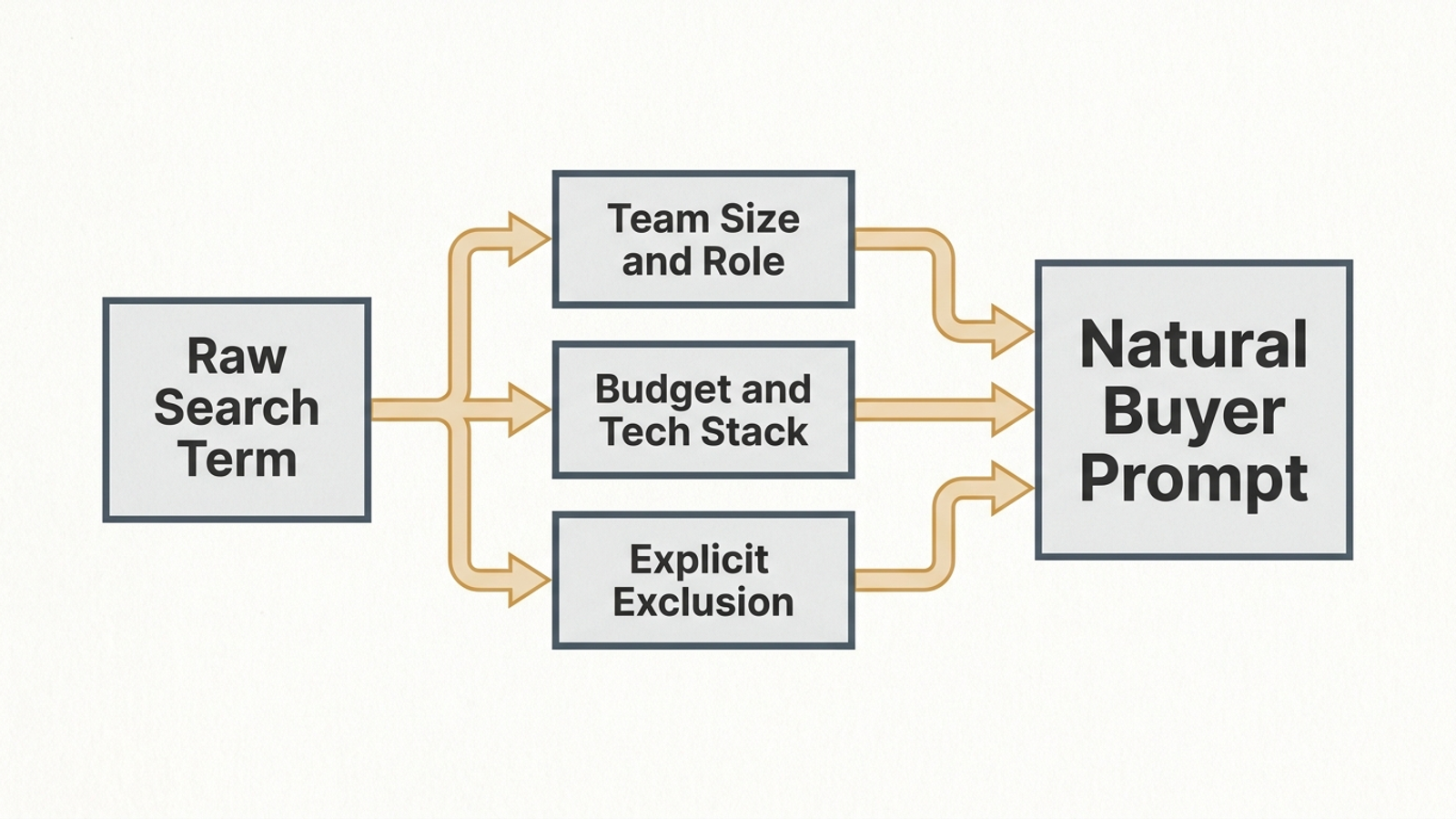
For a cluster around paid search management, the working prompts might look like this:
Cluster: B2B PPC Agency
Prompt 1: "We are a B2B SaaS company spending $25,000/month on Google Ads. Which paid search platforms or partners specialize in qualified pipeline rather than form fills, without charging a percentage of ad spend?"
Prompt 2: "What is the best alternative to traditional PPC agencies for a 15-person marketing team that needs continuous autonomous bidding and negative keyword management?"
Prompt 3: "Compare top Google Ads management solutions for mid-market B2B with HubSpot integration under a $4,000 flat monthly fee."
These are example prompts, not facts about your customers. Substitute the contexts and constraints that fit your own query inventory. Write 3 to 5 prompts for each cluster and paste the resulting 30 to 50 into column A of Prompt Map. Put each prompt’s cluster label in column B. If a blank cursor slows you down, adapt the structure in our 60 buyer prompts for AI search, then edit the details to match your demand.
Expected result: Prompts that make the engine address a recognizable purchasing decision. The constraint is doing work: it distinguishes a general list of providers from an answer about a buyer’s actual operating conditions. That is the useful idea behind constraint-focused prompt analysis.
Common mistake: Making every prompt broader in the hope of appearing more often. What is the best CRM? invites a generic list. What is the best CRM for a 20-person commercial HVAC subcontractor using QuickBooks without custom API development? asks the engine to weigh a particular fit. The question is whether your business can answer those constraints clearly, not whether it appears in every imaginable list.
Step 4: Test unprompted answers and log what wins
Set up the remaining headers in row 1 of Prompt Map:
- Column C:
Engine— ChatGPT, Perplexity, Gemini, or Google AI Overview. - Column D:
Brand Named?—YesorNo. - Column E:
Position in Output—#1 Recommendation,Bulleted Feature,Footnote Mention, orAbsent. - Column F:
Competitors Named— the brands recommended or cited. - Column G:
Cited Source URLs— the direct links and footnotes shown. - Column H:
Gap Classification— leave this blank until Step 5.
Start with three prompts, preferably from different clusters. For each one, use a clean incognito window or guest profile rather than a session shaped by your browsing history or custom instructions. In ChatGPT, enable web search. In Perplexity, use standard web search mode. In Google, enter the prompt in Search to check for an AI Overview, or use AI Mode. If an Overview does not appear, record that rather than inventing a result. Log the answer each engine actually gives. When you extend the audit to the rest of the map, use a separate row for each prompt-and-engine result so one answer does not overwrite another.

Expected result: A small, comparable baseline: who received the recommendation, how prominently your brand appeared, and which pages the engine used as evidence. Then keep running the remaining prompts. Consistency matters more than racing through all 30 to 50 in one sitting.
Common mistake: Nudging the assistant with a follow-up such as “What about our company?” That tests whether it can discuss you after a hint. It does not test what an unassisted buyer sees. Do not grade a closing “other options include…” mention as a primary recommendation, either. Mark it Footnote Mention and move on.
Step 5: Classify the gap before changing a page
Read columns D, E, and G for each tested result. For prompts where you did not earn the primary recommendation, put one of these labels in column H:
Named but not cited: The answer mentions your brand but provides no clickable source from your domain.Cited but not named: The engine cites your page as evidence yet recommends a competitor as the solution.Absent entirely: Your brand and pages do not appear, while competitors receive the recommendations and citations.
These labels, used in AEO diagnostic audits, describe what you observed. They do not prove why the engine answered that way. That distinction saves you from rebuilding a site because of three disappointing prompts.
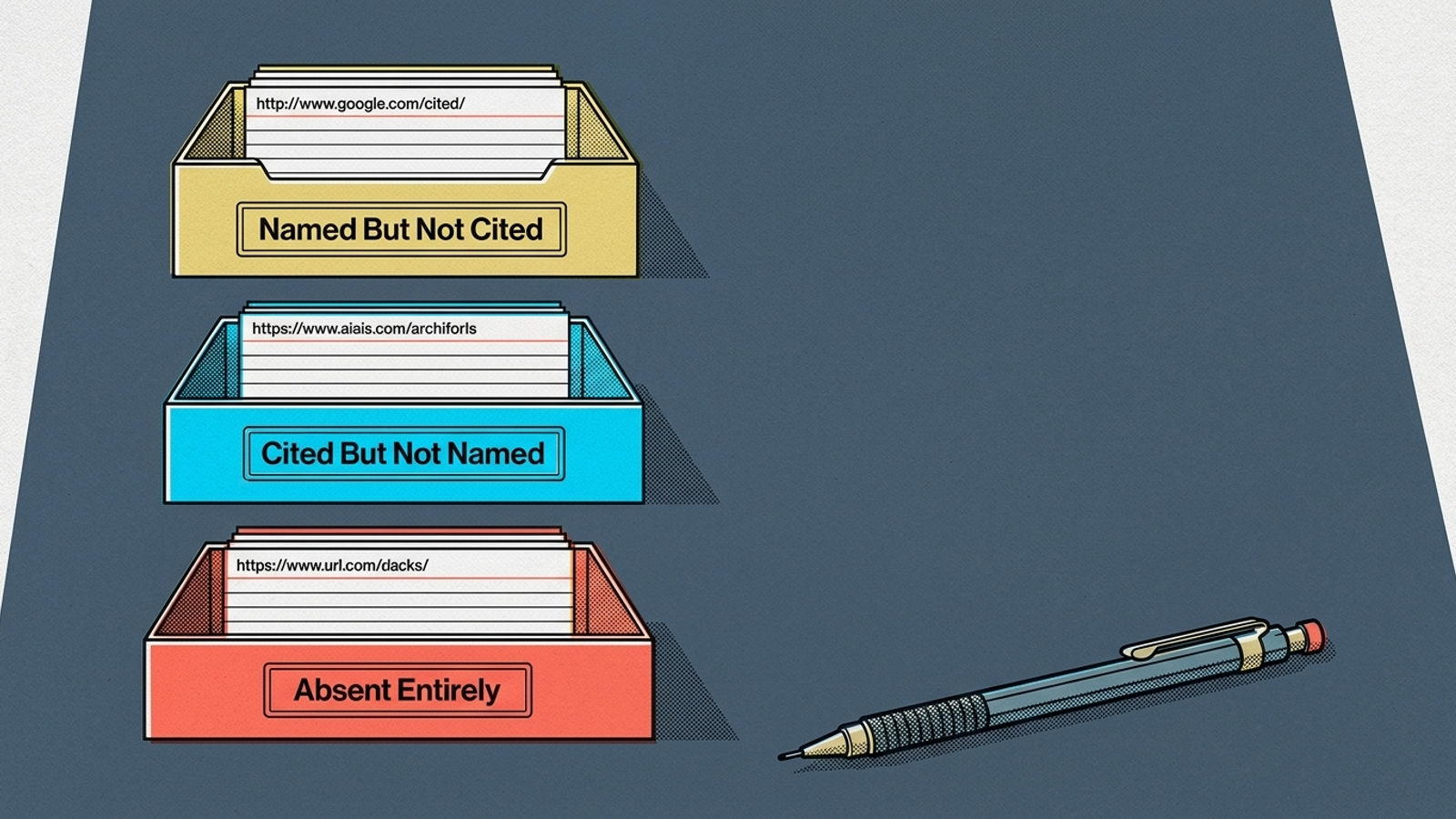
Start with a Cited but not named result if it belongs to a high-value cluster. Open the exact cited URL. Can a reader tell, without piecing together three pages, whom the product serves and how it addresses the prompt’s constraint? If not, make that answer explicit on the page. A comparison matrix, pricing table, or clear ideal-customer statement may be appropriate if the page needs one and you can support what it says. Citation gives you a concrete place to work; it does not guarantee a recommendation after the next crawl. That is the practical advantage of this gap, as tactical AEO audits point out.
For Named but not cited, check whether your accessible pages state the current details the prompt asks about, such as pricing or product fit. For Absent entirely, inspect the landing page tied to the converting search term. If it offers little readable explanation beyond a form, you may have validated demand with paid search without giving an assistant much page content to cite. Record what is missing before deciding whether the fix is content, page access, or positioning.
Expected result: Each tested failure has an observed label and a specific page or question to inspect. Common mistake: Treating the label as a diagnosis. The sheet tells you where to investigate. It cannot tell you that a backlink campaign, a site overhaul, or three new blog posts will fix the answer.
Step 6: Keep the useful prompts running
Once the first audit has shown you which clusters matter, decide which prompts deserve repeat checks. Keep the converting terms and recurring buyer problems at the front of the queue. A standalone visibility tool may help run those checks, but monitoring is not execution. A dashboard can show that a competitor displaced you; it cannot, by itself, revise the page that missed the constraint or change how you manage the paid demand behind it.
That is the tradeoff behind paying for AI prompt tracking. Pricing comparisons describe plans ranging from limited prompt allowances to much larger contracts. Before buying one, decide whether the saved testing time is worth the fee and who will act on what it finds. Our breakdown of whether tracking AI prompts is worth paying for goes deeper on that decision. The prompt list itself should not be a black box you rent back from a vendor.
At groas, we treat paid search and organic AI visibility as connected work: specialized models execute campaign and search-visibility tasks continuously, while a named strategist sets direction and guardrails. The point is not to collect more screenshots of AI answers. It is to connect a prompt that reflects converting demand to the page, campaign, or positioning decision it exposes.
Expected result: A repeatable audit queue tied to commercial intent. Common mistake: Buying a tracker before assigning someone to inspect the cited URLs and make the fixes. Software can keep running your prompts. It cannot decide what your buyers meant by them.
Verify the map, then make one fix
Rerun three prompts from your sheet and open the URLs the engines cite. Check whether each page actually answers the context, objective, constraints, and exclusion in the prompt. If a cited page does not, you have a specific gap to work on.
Start with the highest-value Cited but not named cluster you found. Open its cited page and add a direct explanation of who the product serves and which relevant constraint it addresses where a reader can find it early. Then rerun the prompt and log the answer, whether or not it changes.
Your converting search terms and Search Console queries gave you the questions. The audit tells you where an answer falls short. You do not need to pay someone to discover hypothetical demand before you use the demand you already bought.